
Instagram Comment-to-DM Automation: The Complete Guide (2026)
How Instagram comment-to-DM automation works, how to set it up step by step, the Meta rules you must follow, and 10 keyword CTA ideas that turn comments into leads.


Instagram comment-to-DM automation sends a direct message to anyone who comments a chosen keyword on your post or Reel. Someone comments "LINK", and a few seconds later they get a DM with the link, while the tool replies publicly so others know to check their inbox. It is the simplest way to turn Instagram engagement into leads, sales and email sign-ups without sitting on your phone all day.
This guide explains how it works, the Meta rules you need to know, how to set it up step by step, and the keyword ideas that work best.
How Instagram comment-to-DM automation works
The flow has four parts:
- Trigger: you choose a post or Reel and a keyword, such as GUIDE, PRICE or LINK. You can also trigger on any comment.
- Public reply: the tool replies to the comment, for example "Sent! Check your DMs 📩". This shows other viewers that the offer is real and nudges more people to comment.
- Direct message: the person gets a DM with your message and a link button to your product, freebie, booking page or WhatsApp.
- Log: every comment and DM is recorded, so you can see who received what and export the leads.
Behind the scenes, the tool uses Meta's official Instagram API to read new comments and send what Meta calls a private reply: a single DM sent in response to a public comment.
Why it works so well
- Comments boost reach. Instagram treats comments as a strong engagement signal, so a "comment to get it" CTA helps the post reach more people.
- The link reaches people where they are. Instead of "link in bio", which loses people on the way, the link lands straight in their DMs.
- It opens a conversation. Once someone has a DM thread with you, it is easier to answer questions, share offers and build trust.
- It runs while you sleep. A Reel that goes viral at 2 AM IST still sends every link on time.
In India, where many buyers prefer to ask questions in DMs or on WhatsApp before purchasing, this is often the best-converting CTA a creator or D2C brand can use.
Meta's rules you need to know
Comment-to-DM is allowed, but only within Meta's rules. A good tool enforces them for you:
| Rule | What it means for you |
|---|---|
| Professional account required | Business or Creator accounts only; personal accounts can't use the messaging API |
| Official API only | Never give a tool your password; connect through the official Instagram login |
| One private reply per comment | Each comment can trigger one automatic DM, not a sequence |
| Reply window | Private replies have to be sent within days of the comment, so switch automation on while a post is active |
| Recipient settings | Some people restrict DMs from accounts they don't follow; those messages may land in requests |
| No spam | Only send what the person asked for; unrelated promotions can get your messaging restricted |
Meta updates these limits from time to time, so check the Instagram messaging docs if you build something at scale.
How to set up comment-to-DM automation (step by step)
Here is the setup in Foxli. Other tools follow a similar pattern.
Step 1: Connect your Instagram Professional account
Sign up for Foxli and connect Instagram with the official login. You need a Business or Creator account, but a Facebook Page is not required.
Step 2: Pick the post or Reel
Open AutoDM and choose a post or Reel. It can be one you are about to publish or an older Reel that still gets comments.
Step 3: Choose the trigger keyword
Pick one short, easy-to-type word, such as LINK, GUIDE or PRICE. Add excluded keywords too, so that comments like "price too high" or "not interested" don't trigger a DM. You can also trigger on any comment if you want every commenter to get the message.
Step 4: Write the public reply and the DM
Keep the public reply short and friendly: "Sent to your DMs 📩". In the DM, thank the person, say in one line what the link is, and add a link button, which gets more clicks than a plain URL in the text.
Step 5: Turn on the follow gate (optional)
With the follow gate on, Foxli checks that the person follows you before sending the link. If they don't, it asks them to follow first. This grows followers, but it adds a step, so use it on high-value freebies rather than on every post.
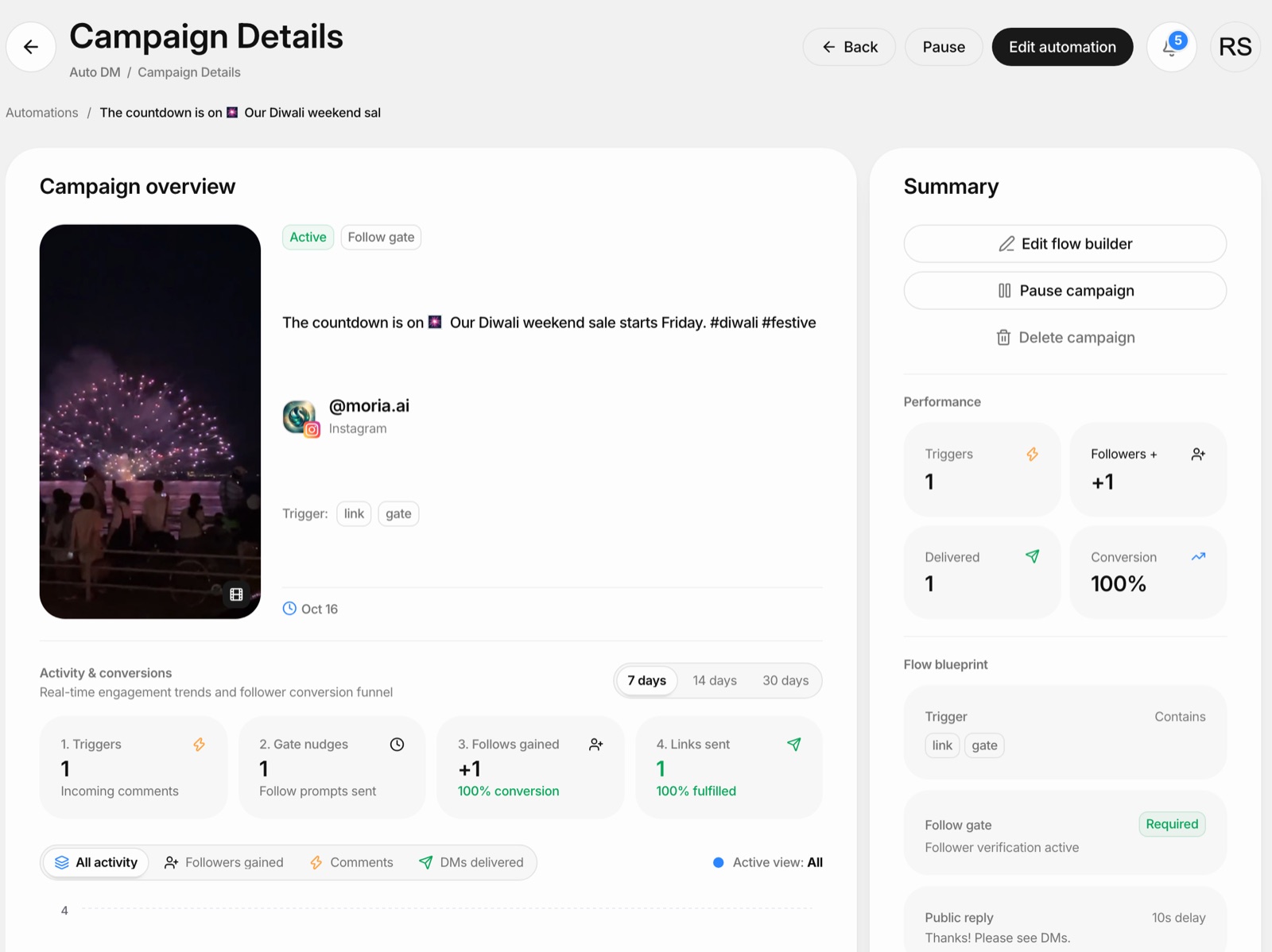
From our own test: we ran AutoDM on one of our own Reels with the follow gate switched on. The person who commented got a follow prompt first, followed the account, and then received the link in their DMs, all without anyone on our team touching a phone. The campaign page showed each step: 1 trigger, 1 follow prompt, 1 new follower, 1 link sent. Pushpendra Singh Rathor, founder of Foxli
Step 6: Go live and watch the run log
Publish the post, or switch automation on for the existing one. The run log shows every comment, whether a DM was sent, and why if it wasn't. Captured leads are saved so you can follow up later.
10 comment-to-DM CTA ideas that work
| Keyword | Offer | Best for |
|---|---|---|
| LINK | Product page | D2C brands |
| PRICE | Price list or catalogue | Local businesses, boutiques |
| GUIDE | Free PDF or checklist | Coaches, educators |
| RECIPE | Full recipe | Food creators |
| CODE | Discount code | E-commerce sales |
| BOOK | Booking or calendar link | Salons, consultants, clinics |
| DEMO | Product demo video | SaaS |
| JOIN | WhatsApp community or webinar | Creators, course sellers |
| GIFT | Festive gift guide | Diwali and wedding-season campaigns |
| TEMPLATE | Free Canva or Notion template | Designers, productivity creators |
For festive campaigns, see how we use the GIFT keyword in our Diwali social media post ideas.
Best practices
- Say the keyword in the first 3 seconds of the Reel and repeat it in the caption. People should not have to guess.
- Use one keyword per post. Several keywords confuse people and split your comments.
- Deliver exactly what you promised. If the caption says "free checklist", the DM must contain the checklist, not a sales pitch.
- Write the DM like a person. "Here's the checklist I promised 👇" beats "Thank you for your interest in our offering."
- Use Hinglish when it fits your audience. "Comment LINK karo, DM mein bhej denge" can feel more natural than formal English for many Indian audiences.
- Check the run log after the first hour. If many comments are skipped, your keyword may be too long or often misspelled.
Common mistakes to avoid
- Asking for a password-based tool. Unofficial tools put your account at risk.
- Choosing a hard keyword. "AUTOMATION2026" will be misspelled; "LINK" won't.
- Forgetting excluded keywords. Otherwise negative comments get a cheerful DM too.
- Leaving automation off old Reels. Your best-performing old Reels often still get comments every day.
- Never following up. The DM thread is a conversation. Reply to questions personally.
Comment-to-DM on Facebook too
The same idea works on Facebook posts and Reels. In Foxli, AutoDM covers both Instagram and Facebook from one dashboard, so a campaign you run on Instagram can also run on the matching Facebook post.
Try it free
Foxli's AutoDM is included on the Free plan for Instagram and Facebook posts and Reels. Free-plan DMs show "Powered by Foxli.app"; you can remove the branding on a paid plan from ₹99 per channel a month. Alongside AutoDM, you can schedule posts to Instagram and six other platforms with the Instagram scheduler.
Start free with Foxli and switch on comment-to-DM for your next Reel.