
How to Schedule and Automate Facebook Page Posts (Free Tools)
How to schedule and automate Facebook Page posts for free with Meta Business Suite or a free scheduler, plus what you can and can't automate on Pages, groups and profiles.


To automate Facebook posts, schedule them for your Facebook Page in Meta Business Suite (free) or in a free scheduler like Foxli. Both let you write posts ahead of time and publish them automatically. One important rule: tools can only publish to Facebook Pages, not personal profiles, and most can no longer post to groups.
This guide shows both methods, what you can automate where, and how to turn Page comments into leads automatically.
What can you automate on Facebook?
| Where | Schedule in Facebook / Business Suite | Schedule with third-party tools |
|---|---|---|
| Facebook Page | ✅ Yes | ✅ Yes |
| Facebook Group | ✅ Group admins, inside the group | ❌ Mostly no (Meta removed group publishing from its API in 2024) |
| Personal profile | Limited | ❌ No (Meta's API doesn't allow it) |
If you run a business, a Page is what you should be automating.
Method 1: Schedule Page posts in Meta Business Suite (free)
- Go to Meta Business Suite and choose your Page.
- Click Create post.
- Select your Facebook Page (and Instagram, if connected).
- Write the post and add photos or a video.
- Under Scheduling options, turn on Set date and time, pick when it should go live, and click Schedule.
You'll find scheduled posts in Planner or Content → Scheduled.
Limits: it covers Facebook and Instagram only, and it schedules several weeks ahead (guides commonly cite up to 75 days). There's no queue of time slots, and no LinkedIn, X, YouTube, Threads or Pinterest.
Method 2: Automate Page posts with Foxli (free)
- Connect your Page. In Channels, add Facebook and choose your Page through Meta's official login.
- Create a post. Open Create, select your Page (and any other channels).
- Check it. The Checks panel shows length and media count (up to 10 items for Facebook), and the live preview shows how the post will look.
- Schedule or queue it. Use Schedule Post for an exact time, or set up queue slots once (for example 11 AM and 7 PM IST) and use Add to Queue so new posts fill the next free slot automatically.
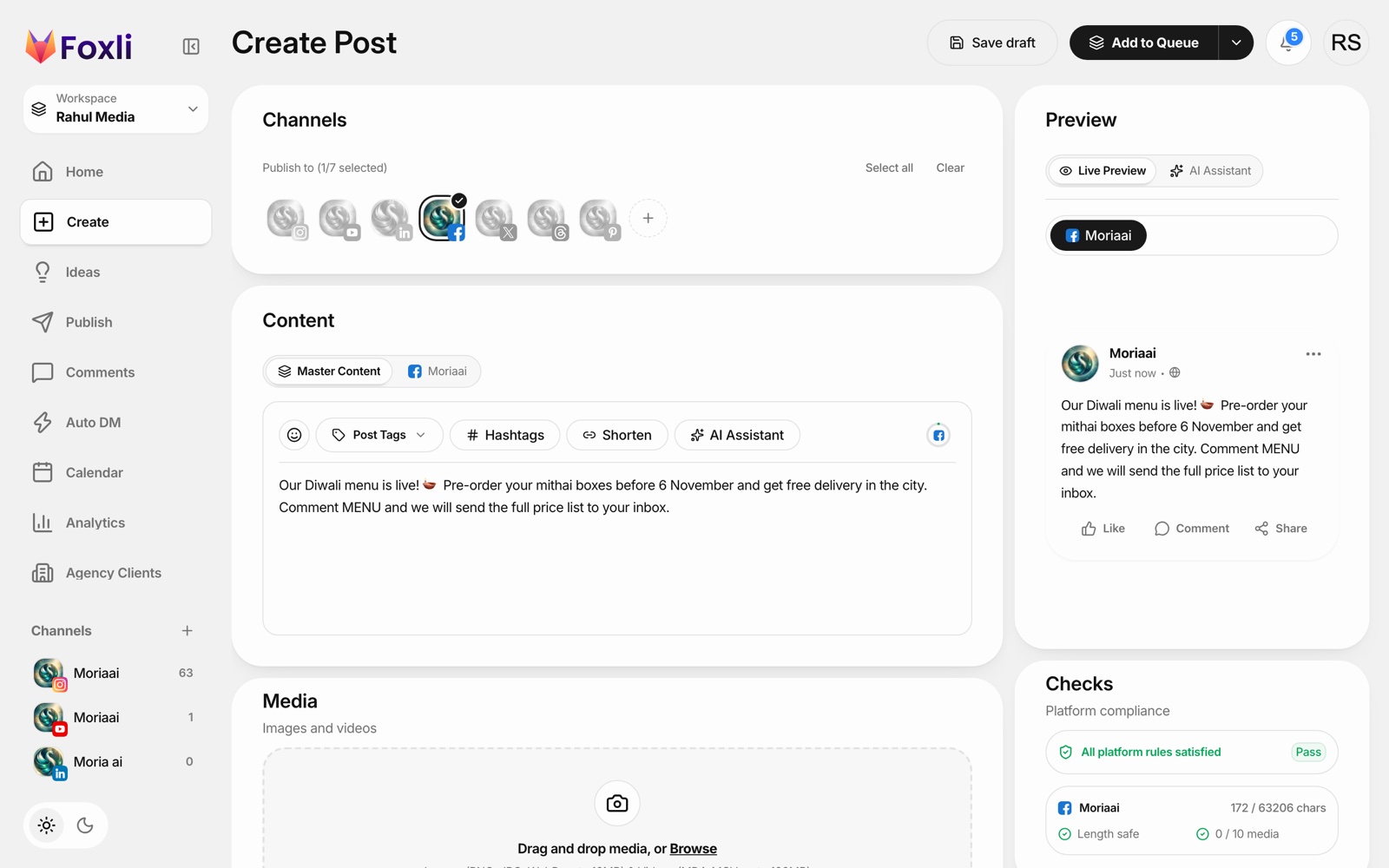
You can schedule text, image, multi-image and video posts to your Page, and publish the same post to Instagram, LinkedIn, X, Threads, YouTube and Pinterest in one go. See Foxli's Facebook Page scheduler.
Automate replies to Page comments
Scheduling is half of automation. The other half is answering people. Foxli's AutoDM works on Facebook Page posts and Reels too:
- Pick the Page post.
- Choose a keyword, for example MENU or PRICE.
- Write a public reply ("Sent to your inbox! 📩") and a DM with a link button.
- Everyone who comments the keyword gets the DM automatically.
From the founder: the post in the screenshot uses this exact pattern: "Comment MENU and we'll send the price list." For a local business, that puts the price list straight into the customer's inbox, where the conversation can continue. Pushpendra Singh Rathor, founder of Foxli
AutoDM is included on the Free plan; Free-plan DMs show "Powered by Foxli.app". For the full setup, read the comment-to-DM automation guide.
Facebook automation tips
- Mix formats. Pages that post only links get little reach; mix photos, short videos and text posts.
- Use a queue for consistency. Two fixed daily slots are easier to maintain than random times.
- Schedule in IST if your audience is in India, and check Page insights for when your followers are online.
- Don't post the same thing everywhere unchanged. Adjust the caption for each platform.
- Plan festivals early. Schedule Diwali, Holi and sale posts a week ahead so your team can take time off.
Which should you use?
- Facebook and Instagram only: Meta Business Suite is free and good enough.
- Facebook plus LinkedIn, X, YouTube, Threads or Pinterest: use a multi-platform scheduler like Foxli, from free.