
How to Schedule Pinterest Pins and Video Pins for Free
How to schedule Pinterest Pins and video Pins for free, using Pinterest's own scheduler or a free tool, with video specs, limits and a weekly pinning routine.


To schedule Pinterest Pins for free, create a Pin in Pinterest with a business account and choose to publish it at a later date, or use a free scheduler like Foxli to plan image and video Pins on a calendar. Pinterest's own option is fine for a few Pins a week; a scheduler is better when you pin regularly or post to other platforms too.
This guide covers both methods, video Pin specs and a simple weekly routine.
Method 1: Schedule Pins in Pinterest (free)
You need a Pinterest business account. Switching from a personal account is free in your account settings.
- Click Create → Pin.
- Upload your image or video.
- Add a title, description, link and alt text, and choose the board.
- In the publish options, choose Publish at a later date and pick the date and time.
- Click Publish. The Pin goes live at the time you set.
Limits of the native scheduler:
- It only works a few weeks ahead, and only a small number of Pins can wait in the schedule at once (guides commonly cite about 30 days and 10 Pins; check Pinterest's Help Center for your account).
- One Pin at a time, with no bulk upload.
- No calendar view of what's coming up.
- Pinterest only, so your Instagram or YouTube posts need another tool.
Method 2: Schedule Pins with a free scheduler (Foxli)
A scheduler connects through Pinterest's official API, so you never share your password. In Foxli:
1. Connect Pinterest and choose a board
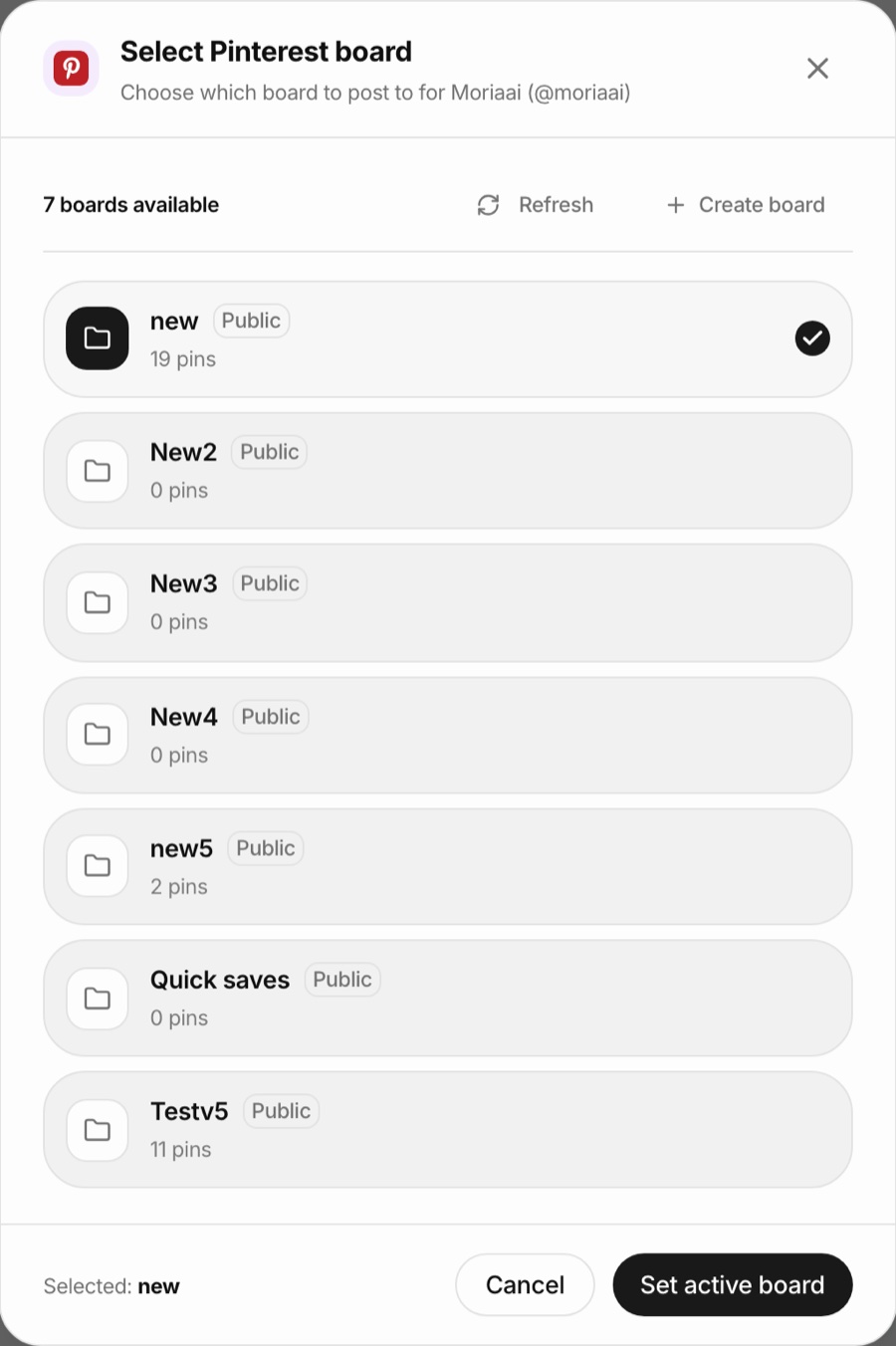
Go to Channels, add Pinterest and approve access. Then pick the active board for that account. Foxli imports your boards with their pin counts, and you can create a new board from the same window.
2. Create the Pin
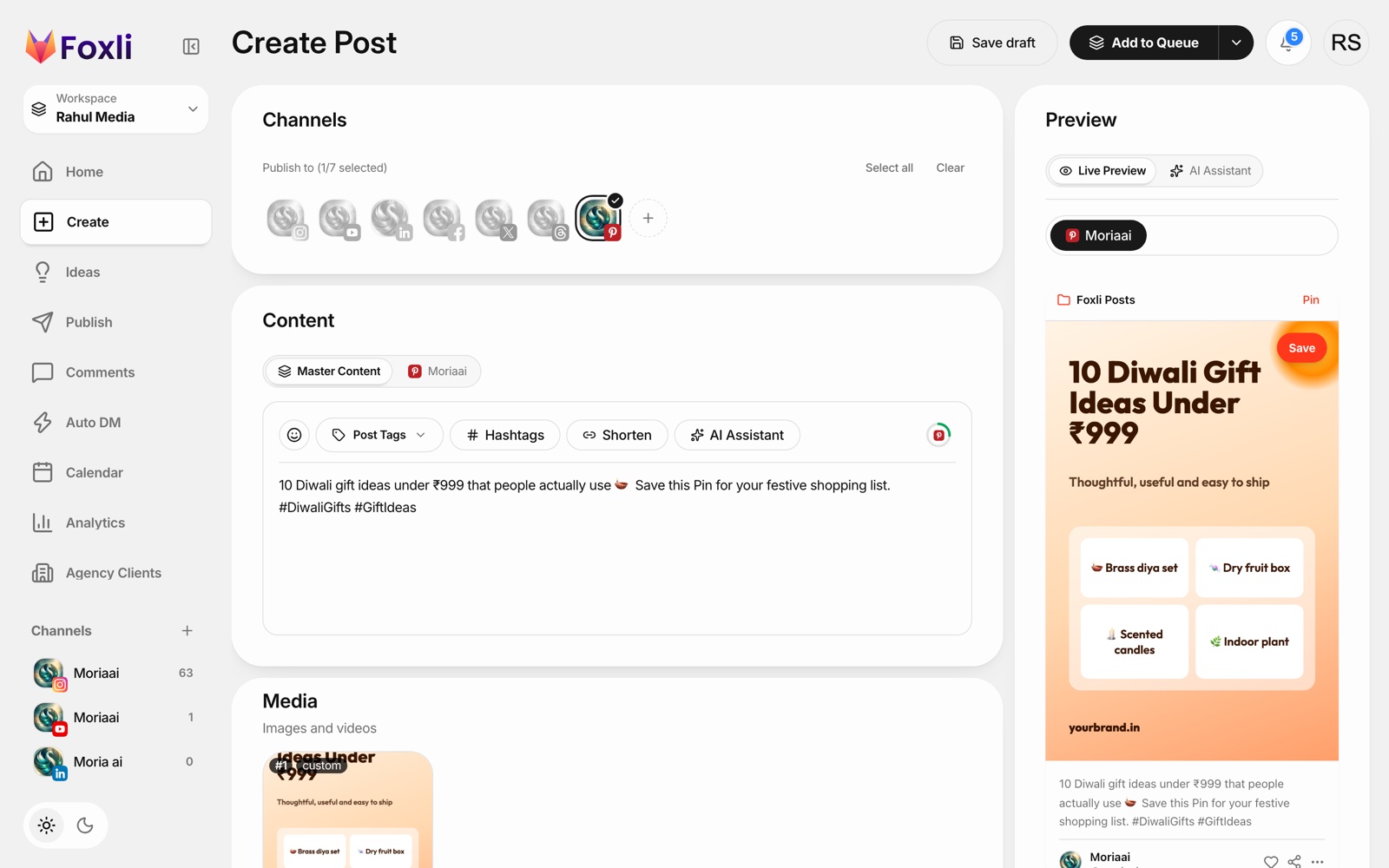
Open Create, select your Pinterest channel, write the description and upload a vertical image or video. The live preview shows how the Pin will look, including the board name.
3. Schedule it
Use Schedule Post to pick a date and time, or Add to Queue to drop it into your next free slot. Every scheduled Pin appears on the calendar next to your other posts.
From the founder: when I connected our own Pinterest test account, Foxli imported all 7 of its boards, and switching the active board took two clicks. Pushpendra Singh Rathor, founder of Foxli
Free plan: 3 social accounts and 10 posts per channel each month. Paid plans start at ₹99 (about $1.20) per channel a month with unlimited posts. See pricing.
How to schedule video Pins
Video Pins are scheduled the same way: upload a video instead of an image. The specs below are widely used guidance; check Pinterest's current specs before a big campaign.
| Spec | Recommendation |
|---|---|
| Aspect ratio | Vertical: 2:3, 4:5 or 9:16 (1:1 also works) |
| Size | 1080 × 1920 px (9:16) or 1000 × 1500 px (2:3) |
| Length | About 4 seconds to 15 minutes; 6–15 seconds suits the feed best |
| Format | MP4, MOV or M4V (MP4 with H.264 is safest) |
| File size | Up to 2 GB |
Tips for video Pins:
- Show the result in the first 2 seconds: the finished recipe, the room makeover, the outfit.
- Add text on screen, because many people watch without sound.
- Use a clear cover frame; it's what people see before the video plays.
How many Pins should you schedule?
For most small accounts, 1 to 5 fresh Pins a day is plenty. Consistency matters more than volume, and fresh Pins (new images or videos) count for more than repinning the same image many times.
A simple weekly pinning routine (30 minutes)
- Monday: check Pinterest Analytics for your top 3 Pins last week.
- Make 5–10 new Pins: new images or short videos, often variations on what worked.
- Write keyword-rich titles and descriptions: describe what the Pin shows in the words people search.
- Schedule them across the week in one sitting.
- Plan seasonal Pins early: people search Pinterest weeks ahead, so pin Diwali, wedding-season and Christmas ideas 30–45 days before the date.
Which method should you use?
| You... | Use |
|---|---|
| Pin a few times a week, Pinterest only | Pinterest's native scheduler |
| Pin regularly or plan weeks ahead | A free scheduler |
| Post to Pinterest and other platforms | A multi-platform scheduler like Foxli |
| Rely on Pinterest for most of your traffic | Compare the options in our best free Pinterest schedulers guide |
Ready to plan your Pins? Try Foxli's free Pinterest scheduler and schedule your first image or video Pin in a couple of minutes.